Take the photos. Tumbuh does the filing.
The Buku KIA, vaccination cards, the birth certificate, the formula tin. Photograph them all in one go. Tumbuh works out what each page is and reads it, then you approve it, one document at a time. Anything missing is asked for gently, and you can skip it.
This is the planned setup flow. We're building it for early access.
Medical records are only saved once a person approves them: you, or a doctor through the optional service. The AI helps read; it never saves anything on its own.
Gather what you have at home
It doesn't have to be complete. Whatever you have is enough to start; the rest can follow.
- Buku KIA (the national mother and child health book)
Child's details · Birth record · Weighing records · Vaccinations
- From the hospital and clinic
Birth certificate letter · Vaccination card · Follow-up book · Prescriptions · Lab results
- Cards
BPJS Kesehatan · Insurance
- What your child has every day
Formula tin · UHT milk carton · Vitamin bottle
Photograph everything in one go
The camera stays open. Snap page after page without choosing what each one is. Tumbuh reads in the background, so you can close the app and come back later.
- ✓One page, one photo. The same page photographed twice gets merged
- ✓Blurry or cut off? Tumbuh asks you to retake just that page
- ✓When reading is done, you get a notice: “9 documents ready to check”
Point at one page
Tumbuh works out what each page is
Buku KIA pages from the Ministry of Health have fixed layouts. So Tumbuh first decides which page it's looking at, then reads it the way that page needs.
- Buku KIA · VaccinationsVaccine and date. A date next to the batch number is the expiry
- KMS · Weighing tableDates and weights. A missing year comes from the age column
- KMS · Growth chartThe dots are used to double-check the numbers in the table
- 🥫Formula tinSent to Milk & formula, not the health record
You approve every value
Each document shows on its own: the photo on top, the values read from it underneath. The AI only proposes. A value from a medical record is saved only after you tick it or fix it, looking at that part of the photo.
- ✓Tap a value and the photo zooms to where it came from
- ✓Approve & save, Retake, or Skip. Skipped documents aren't saved
- ✓Stop whenever you like. Anything not yet approved waits in the document inbox
- ✓Different from what's already recorded? You choose; nothing is quietly overwritten
- DPT-HB-Hib 126 May 2025✓
- Polio drops 226 May 2025✓
- DPT-HB-Hib 230 Jun 2025check
- DPT-HB-Hib 3Two dates read. Which is the vaccination date?4 Aug 2025Sep 2025next to the batch no.
No time to check? Let a doctor match it up
Just photograph and upload. The AI reads and flags anything doubtful, then a doctor matches every value against its photo before it goes into your child's record. Still, nothing is ever saved by AI alone.
- ✓You can still see and correct everything at any time
- ✓The doctor only opens the documents you send for checking, with your permission
- ✓This is a data check, not a consultation. Through this service the doctor doesn't diagnose or advise on treatment
💳 Rp100,000 once, for the initial setup. Free with the 12-month plan. See the Pricing page
- ✓Uploaded
- ✓Read by AI
- 3Doctor check
- 4In the record
- 1You upload photos
The Buku KIA, KMS card, birth letter, vaccination card. No checking needed.
- 2The AI reads them
It works out each page and flags doubtful values.
- 3A doctor matches them
Every value is checked against its photo. Anything unreadable comes back to you as a question.
- 4Into the record
Marked “Checked by a doctor” with the date. You're notified.
Doubtful values are flagged first
Handwriting in the Buku KIA isn't always easy to read, for AI too. When we tried it on a real vaccination page, the AI misread about half of the handwritten dates, and often looked sure of itself. So no medical record is saved without your approval, and Tumbuh flags the doubtful values so you know where to look.
Date of birth, sex, gestation, birth weight, length and head size, every weigh-in with its date, vaccines given, allergies, current medicines
- The AI proposes, you approve every value
- Doubtful values are marked yellow, conflicting ones red
- Checked against WHO standards, the national vaccine schedule, the age columns in the Buku KIA and earlier records
- Its origin is kept: which photo, what was read, who approved it
Blood type, APGAR, lab results, notes, doctor and clinic names, BPJS, insurance
- Medical values are still approved by you, one by one
- Admin details such as a BPJS number may come pre-filled
- Checked for format
What's flagged before you approve
- An expiry date read as the vaccination date
“Sep 25” next to the batch number is when the vaccine expires, not when it was given. Flagged red.
- A date outside its age column
Written in the 2-month column but read as 5 months old. Flagged to check.
- 92 kg for a 9-month-old
Almost certainly a misread, probably 9.2 kg. Also compared with the dot on the KMS chart.
- DPT 2 only 15 days after DPT 1
Closer than the schedule's minimum gap. Flagged to check.
Milk and vitamins: from the label
Photograph the nutrition label on the tin. Tumbuh reads the numbers and the scoops from the preparation table, then shows them next to the photo for you to check before saving. From then on, every bottle counts vitamins and minerals for that product and the scoops you actually use.
- ✓Labels are sanity-checked: the energy has to match the protein, fat and carbohydrate
- ✓The milk's stage is matched to your child's age. When it's time to move up, Tumbuh asks
- ✓A daily vitamin can become a task for the caregiver straight away
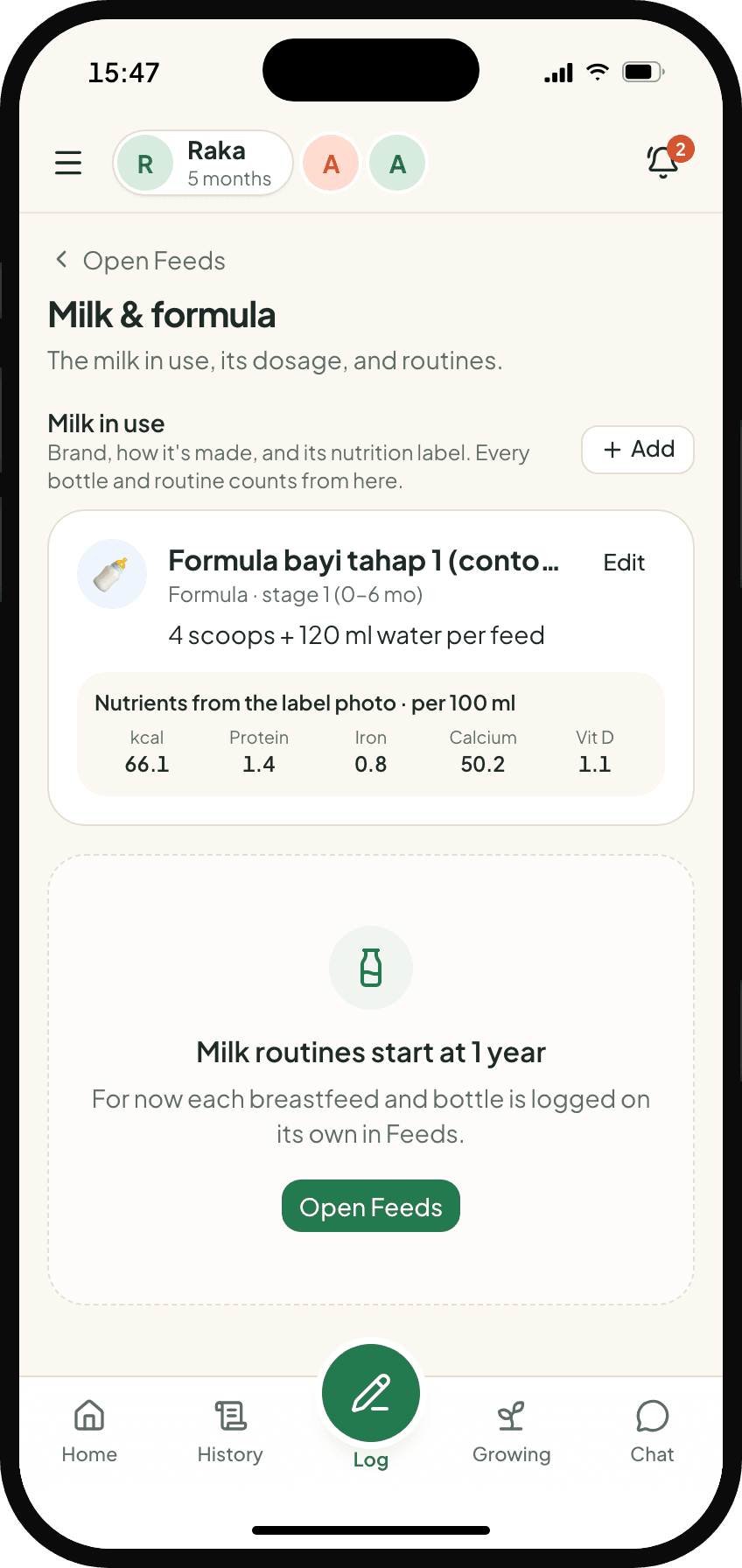
What's missing is asked for, one at a time
Once every photo is checked, Tumbuh sees what's still empty and orders it by what matters most at your child's age.
- MustBirth details, the latest measurement, vaccination history
- ImportantMilk in use, allergies, parents' heights, illness history
- Nice to haveBlood type, BPJS, APGAR, your usual doctor
- ✓Each gap is one card: a photo first, else a one-tap choice, typing last
- ✓Skip it, or answer “Don't know / don't have”. Anything answered is never asked again
Used for the growth chart and corrected age.
The photos are for your child, nothing else
- Photos and data are encrypted, and you can delete them any time
- Nothing about your child is ever sent to a search engine
- Photos are only used to train our reader if you give specific permission, as Indonesia's data protection law requires